 By
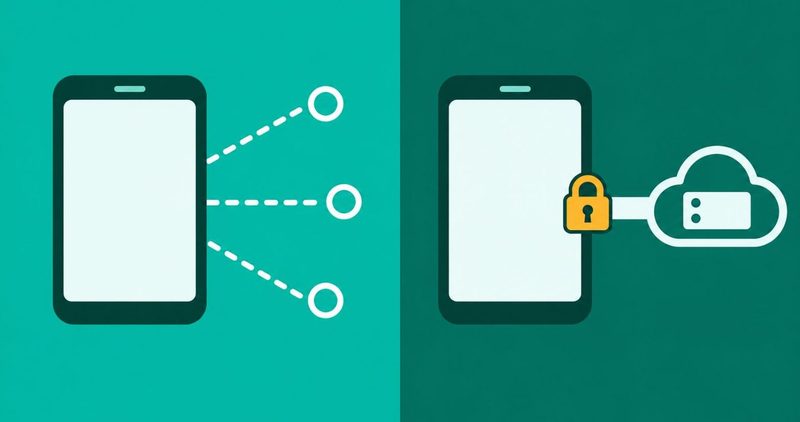
The short version
- Two jobs only. Seal the connection, swap the IP.
- The sealed envelope. Your ISP and the WiFi owner cannot read inside the tunnel.
- The borrowed address. Websites see the VPN server's location, not yours.
- The hard limit. Malware, phishing, logins, GPS and your own taps sit outside the tunnel.
- Android's built-in switch. Always-on VPN plus Block connections without VPN is the kill switch your phone already has.
You know this scene by heart. The ban dropped on 5 June 2021, MTN data stayed alive, and ordinary browsing crawled back at the speed of a drip. Your thumb hovered over the VPN banner the whole time. I kept one on my phone for a month. Here is the honest version of what it does and what it never will.
Picture 1: the sealed envelope
Think of your data as letters. Without a VPN, the envelope leaves your phone unsealed, open to anyone holding it. A VPN wraps every letter into one sealed envelope before it leaves. Only the VPN server holds the way to open it.
Surfshark's explainer names the seals first: AES-256 and ChaCha20 are the common ones. PIA's beginner guide counts four steps to the seal. The ISP and the WiFi owner see one sealed envelope going to one server. They cannot read inside it.
One more seal exists on most websites. HTTPS, the padlock in the address bar, is your browser's own envelope. A VPN wraps a second envelope around everything, apps included, even apps that never use HTTPS. Proton's page frames the trio cleanest: Connect, Conceal, Circumvent.
Picture 2: the borrowed address
Every device carries an IP address. It is the street address of the internet, and sites read it to place you. Connect a VPN and your traffic exits from the VPN server. The site sees the server's address, not yours. Pick Lagos and you look Nigerian. Pick London and you look British.
Proton's Conceal step says the same thing. Ghostery confirms the mask holds while the encryption stays unbroken. Sites see only the VPN server's IP, never your real one.
The proxy correction. A proxy extension borrows an address. It seals nothing. It usually covers one browser, and it leaves your apps, DNS and metadata exposed. A proxy is a mask with no tunnel. On the IP-masking query, a proxy extension sat at number one on 30 September 2026. If a listing promises to hide your IP, check that it encrypts the tunnel too. Most free proxy extensions do not.
Picture 3: the bodyguard at the door
Ghostery's rundown prints the honest list. A VPN does not block online trackers or ads. It does not stop browser fingerprinting. It does not stop websites identifying you after you log in. It does not protect against malware already on your device.
Windscribe's list adds two more. Your GPS location never changes. Signed-in accounts know you regardless of IP. Your ISP can still see that you use a VPN, plus how much data you move. A VPN adds about 5 to 15 per cent to your data usage.
Google Maps does not read your IP. It reads your phone's GPS, the same chip that tells a ride-hailer where you stand. A VPN cannot change where the phone is standing.
For the malware half, see our guide to stopping malware on Android. Passwords belong to your habits.
So the bodyguard stops at the door. Everything past it, your logins and your taps, is your habit to police.
| Item | With a VPN | Without a VPN |
|---|---|---|
| Your IP address | Server's address shown | Yours shown |
| Location a website sees | Server's country | Your country |
| ISP and WiFi owner | Scrambled traffic, volume visible | Destinations visible |
| Email you signed up with | Exposed | Exposed |
| GPS in Maps | Unchanged | Unchanged |
Three buttons that matter: protocol, kill switch, leaks
The protocol button chooses how the envelope is built. Nord's page lists the ones you will see, and warns PPTP is no longer recommended for serious weaknesses. Surfshark's page calls WireGuard one of the fastest protocols available.
- WireGuard: new, lean and fast. The sensible default, and the lightest on battery.
- OpenVPN: open source, works almost everywhere. Heavier on battery.
- IKEv2/IPSec: best on phones that hop between WiFi and mobile data. Higher draw than WireGuard.
- PPTP: old and weak. Avoid it. No modern battery data exists for it.
Windscribe's protocol comparison puts WireGuard ahead on battery drain. Smaller codebase, faster connects, less drain. OpenVPN pays for its reach with weight.
The kill switch button is built into Android, no app required. Google's Android Help page prints the procedure, read on 12 November 2026. Open Settings, tap Network and internet, tap VPN, tap the gear next to your VPN, turn Always-on VPN on. If HiOS hides the gear, search always-on in Settings and toggle it there.
Android can also block everything outside the tunnel. The Block connections without VPN switch sits beside Always-on on supported builds. Leave it off until the tunnel proves stable: Whizz reports Android may cut all internet when the VPN cannot connect, read on 12 November 2026.
The leak test is one sentence: a DNS leak is your address book bypassing the tunnel. Type a DNS leak test into your browser after connecting. dnsleaktest.com is the common tool. If the results show your ISP's server, your phone is asking directly, tunnel or no tunnel.
VPN vs antivirus
A VPN seals the road your data travels. Antivirus inspects what arrives at the device. A sealed road does not stop a booby-trapped file. An antivirus does not hide your IP. Which one you need depends on the phone and the habits. The full device side lives in our antivirus guide for Android.
Nigeria: why the country already knows
The Twitter ban ran in Nigeria from 5 June 2021 to 13 January 2022. Wikipedia's record prints both dates.
A 2023 SAGE survey of 319 respondents found 264, 83 per cent, turned to VPNs through the ban. The journal blocks automated readers, so it carries no link here. Its search listing confirms the figure, checked 12 November 2026.
WireGuard made VPNs lighter, and Android built the kill switch into Settings. The hunt a 2021 reader ran is now a toggle. Free still costs, and VPN companies are businesses. A free tier pays for itself somewhere you will not see. Afrobarometer flagged exactly that.
| Date | Event | Source |
|---|---|---|
| 5 June 2021 | Twitter suspended in Nigeria | Wikipedia |
| 5 June 2021 | Ban-day press | Guardian Nigeria |
| 25 Feb 2026 | VPN basics explainer, updated | hostafrica.ng |
| 13 January 2022 | Suspension lifted | Wikipedia |
| 2023 | 83 per cent of 319 respondents used VPNs | SAGE journal |
Using one safely: the 5-minute checklist
Five steps, in order. No provider named; the page teaches the mechanism.
- Install your chosen VPN from the Play Store, not a search ad.
- Pick WireGuard if the app offers it.
- Turn on Always-on VPN (search always-on in Settings).
- Turn on Block connections without VPN once the tunnel proves stable.
- Run a leak test and an IP check; confirm the server city changed.
The free side of that decision lives in our free VPN guide.
What I tested on my phone, and what I could not
Device: my phone running HiOS. No VPN was connected on the house phone, no menu was opened, no fault was induced. Nothing here prints as device-tested.
My month with the banner on my own status bar is a month of ordinary use, not a scored run. The key icon shows while the tunnel is up, and the notification camps there while it is.
The Always-on procedure prints as Google publishes it, plus a Settings search string for HiOS. The IP pair and the leak test are reader steps to run, not results copied from this phone. No-logs claims stay cited to the vendors and auditors that make them, never to the house phone. HiOS labels move between builds, so search the words, not the path.
Questions readers ask
Google Maps knows where I am on VPN. Is it broken?
No. Maps reads GPS, not IP. The VPN never touched that chip.
Is a proxy extension the same as a VPN?
No. A proxy borrows an address and seals nothing. A VPN seals the tunnel and borrows the address together.
Do I need the kill switch on?
Yes, on untrusted networks. Android has it built in. See the procedure above, and keep Block connections without VPN off until the tunnel proves stable.
WireGuard or OpenVPN, which button?
WireGuard for most networks. OpenVPN where WireGuard is blocked, and IKEv2 when you hop between WiFi and mobile data.
What is a DNS leak in one sentence?
Your address book bypassing the tunnel, in plain words.
Why did everyone in Nigeria download a VPN in 2021?
The Twitter ban. It ran from 5 June 2021 to 13 January 2022, and 83 per cent of the 319 SAGE respondents turned to a VPN.
The bottom line
A VPN seals your connection and swaps your IP. It will not hide your GPS, your logins or your own taps. The three pictures, pinned: the sealed envelope, the borrowed address, the bodyguard who quits at the door. If the problem is the connection, a VPN helps. If the problem is the phone or the habit, it does not. The common faults around this one sit in our Android problems hub. Read our VPN decision guide.
Comments
New posts held for reviewCouldn't load comments - the thread service didn't answer. Nothing is being hidden: no approved comments are saved with this page.
No approved comments yet - the first one is yours. New posts are held for review before they appear.