 By
By 
Phone batteries rarely die of a defect. They die of habits: draining to zero before you find a socket, leaving the phone pinned at 100 percent overnight with no cap turned on, and trusting a no-name charger from a market stall. Most of what people believe about charging was inherited from phones that do not exist anymore. Here are the seven charging mistakes that damage your phone battery, and the fix for each one.
1. Letting the battery hit zero before you charge
Lithium-ion cells do not like being emptied. Battery University, the reference site run by Cadex (the company that builds real battery test equipment), explains why a full discharge stresses the cell while shallow discharges are gentler. A phone that dies in your pocket most days wears out faster than one you recharge at 30 or 40 percent, and that difference shows up as battery health months later.
The fix is the opposite of saving charges: plug in whenever you get the chance. A five-minute top-up at your desk, a short session on the cable between meetings. Shallow top-ups beat the one deep zero-to-full cycle you take home at night, every time.
The old advice to “limit charges per day” gets this backwards. Battery wear is counted in full-cycle equivalents, not in sessions on the cable: ten shallow 90-to-40 percent top-ups together cost the battery less than two or three zero-to-full cycles. Frequent charging is the gentle habit. It is the deep drain you should ration, so ignore anyone telling you to save your charges for later.
The old warning that a charge from zero is extra damaging because it takes longer is not right; it only takes longer, and the emptying, not the refilling, is what does the harm. If you want a comfort band, 15 to 80 percent is a fine rule of thumb, but treat it as a helpful habit, not a spec Google or Samsung ever mandated. What the two companies ship in their settings (next section) confirms the direction without naming the band.
2. Leaving the phone at 100 percent every single day
“Do not overcharge it” is advice from phones that stopped listening to you years ago. Modern charging circuits stop pushing current when the cell is full, so the phone cannot be overflowed like a bucket. The real wear comes from routine full charges and long stretches pinned at the top, which is what Battery University means when it says to avoid charging to 100 percent where you can.
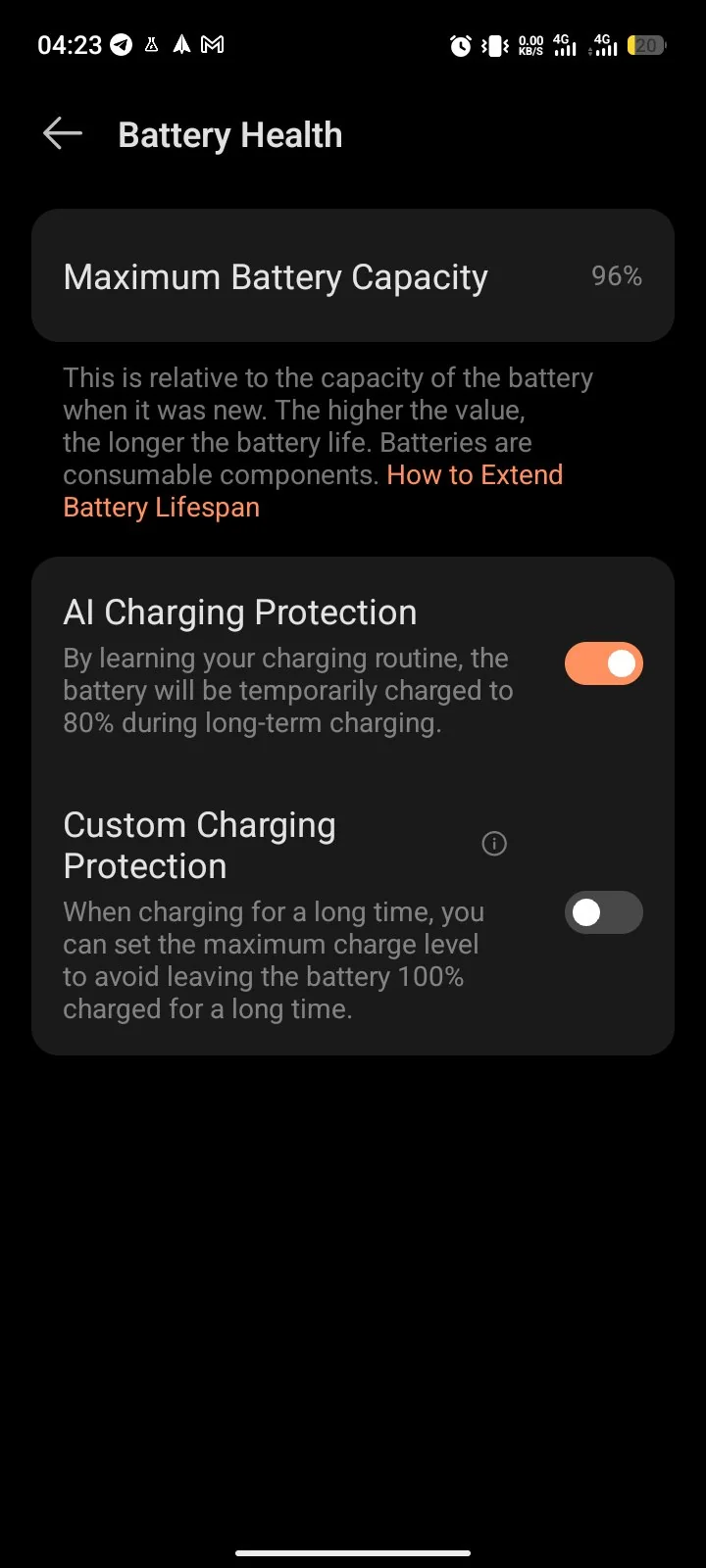
Google and Samsung have already built the fix into the software. Adaptive Charging on Pixel learns when you wake up and holds the charge near full until the last hour of the night. Protect Battery on Samsung stops the charge at around 80 percent, 85 on some models, and keeps it there while you sleep. Turn on whichever cap your phone offers, and save the charge to 100 for the morning you are leaving the house for a long day.
3. Cheap, uncertified chargers
Google and Samsung both tell you to use the charger that came with the phone or a certified replacement, and Samsung specifically warns against non-approved chargers. Unbranded bricks skip the safety parts that certified chargers include, and a badly built charger can damage the battery or start a fire.
A certified charger from a brand you can name, with USB-IF certification or USB Power Delivery support (PPS as well on Samsung phones), is safe and costs less than the OEM box. The enemy is uncertified chargers, not third-party ones. What to stop buying is the no-name brick with no rating labels printed anywhere on it.
4. Storing your backup phone dead
A backup phone kept at zero for months can lose its ability to hold a charge at all, which defeats the entire point of a backup. But “always keep it charged” is wrong too, because a cell stored at 100 percent is under stress the whole time it sits. Battery University’s storage guidance is a half-charged cell, somewhere in the 40 to 60 percent range, in a cool dry place, topped up every few months.
Here is the routine to keep a backup on: about 50 percent, in a drawer, plugged in roughly once a quarter. A protective case and a quality charger do nothing for a phone sitting in storage. Charge level and temperature are the only two variables that matter there.
5. Third-party battery monitors and optimizer apps
Android already ships the tool for this job. Open Settings → Battery → Battery usage and the screen lists every app and how much power it has taken. It runs inside the system, it costs you no extra drain, and it is where you should be looking for a battery hog. Then tap the app and set its App battery usage to Optimized if it is misbehaving.
There is no number worth quoting for how much battery a monitoring app itself burns, because no test I trust exists. The pattern is consistent: sideloaded boosters and cleaning apps never beat the built-in screen, they sit outside Google Play Protect, and they get people force-stopping the wrong things. Keep Play Protect on, install nothing that promises to extend your battery, and uninstall anything already doing it. On the battery question, the settings screen is the app.
6. Heavy use while the phone is on the cable
Heat is what ages a battery fastest, and Samsung and Google both say it plainly on their battery care pages. Charging warms a phone on its own; add a 3D game or video recording on the cable and the temperature climbs, and a warm battery charges deeper into stress. Light use is fine: calls, reading, and WhatsApp on the charger hurt nothing. The mistakes are gaming, recording, navigation at full brightness on the cable, and any of those out in direct sun. Your phone will not explode; it will just be older sooner.
7. Plugging in a wet phone
Water and current in the same port is a real hazard, not folklore. Moisture can short the charging port and the battery circuits, and charging a wet phone carries a risk of electric shock or fire. Power the phone off, let it dry completely, then charge.
In 2026 the phone mostly polices this for you: current Pixels and Galaxy phones detect moisture in the port, show a warning, and refuse to charge until things are dry. If you get that warning, take it seriously. Unplug the cable, let the port air dry, and do not force a charge with a different cable or a bag of rice. Once the warning clears, charge as normal.
The seven habits worth keeping
The seven habits in one line: recharge before zero and top up freely through the day, turn on your phone’s charge cap instead of fearing overcharge, use only certified chargers, store the backup phone half-charged in a cool drawer, trust Settings → Battery → Battery usage over any app, keep heavy gaming off the cable, and never plug in a wet phone. Six of the seven cost nothing and take one evening to set up. Do them and the battery health your phone reports two years from now will be measurably better.
Comments
18 approved · new posts held for reviewCouldn't load comments - the thread service didn't answer.